
Copy Paste 30 Minute Virtual Scavenger Hunt List for Remote Employees
Use a mixed-category template, not a pure fetch list, and give it 15 to 30 minutes depending on your meeting slot. Mixing home-office finds, personal items, perspective shots, and quick action tasks keeps energy high past round two, when straight scavenger-hunt games usually go flat. Pick one of the ready-to-run lists below, assign a host and a scorekeeper, and put it on the calendar this week. What follows covers the templates, the facilitator runbook, inclusion rules, and a scoring structure so you can build a hunt around your team’s size and schedule instead of guessing.
TL;DR:
- Short, fast-paced rounds of 60 seconds with story bonuses maintain energy and engagement, especially when timers are tightened to create urgency.
- Teams should assign roles, test technology beforehand, and set clear opt-out and asynchronous participation options to prevent discomfort and technical issues.
- Use mixed-object and themed lists to sustain interest over multiple sessions, adjusting for team size and cultural relevance.
- Limit active participants to around four players per group and keep prompts inclusive to avoid privacy breaches and exclude private spaces.
- Ending with a shared photo or story enhances team cohesion and leaves a memorable impression beyond the activity itself.
Table of Contents
- Virtual Scavenger Hunt List for Remote Employees: Ready-to-Run Templates
- How to Host a Virtual Scavenger Hunt Step by Step
- Privacy, Accessibility, and Team-Size Rules That Prevent Awkward Moments
- Formats to Match Your Team’s Energy and Risk Tolerance
- A Copy-Paste 30-Minute Agenda You Can Drop Into a Calendar Invite
- Why This Format Works and a Facilitator Checklist to Keep Handy
- One Tweak That Changed How Our Sessions Landed
- Turnkey Facilitation When You’d Rather Not Build the Runbook Yourself
- Sources
Virtual Scavenger Hunt List for Remote Employees: Ready-to-Run Templates
To run a good hunt quickly, consider templates including a brief speed round, a mixed-round master list, and themed variations for different session types. Every list mixes prompt types on purpose. Practitioners who’ve tested dozens of these hunts consistently mix office objects, personal items, and time-based tasks because pure fetch-item lists lose steam fast, while mixed formats hold attention through multiple rounds.
The 15-minute speed round
This is your zero-prep option for a standup, a Friday wrap-up, or a stretch break in a longer meeting. Give players about a minute per item and run multiple prompts consecutively for a brisk, engaging round. Deel’s research on remote engagement backs this up directly: short, no-prep activities folded into existing meetings outperform separate hour-long events for busy distributed teams.
- Something with your company’s color on it
- A mug that isn’t your favorite
- Something older than your current job
- A pair of shoes you have not worn in six months
- Something with a typo or misprint
- A book you have not finished
- Something you can wear on your head
- A snack you’re embarrassed to admit you love
- Something blue that isn’t clothing
- A charging cable you don’t recognize
- The oldest electronic device you can find
- Something that makes noise when shaken
Award one point per item found within the time limit, two points for the first person back on camera holding it.
The 30-minute mixed-round master list
This is the workhorse list for a dedicated team-building slot or the first 30 minutes of an all-hands. It runs in six short rounds so no single format wears thin.
- Warmup (items 1 to 3): something red, something with your initials, something you’d grab in a fire drill
- Work-related (items 4 to 6): your first work laptop or notebook, a printed document older than a year, something that represents your job in one object
- Personal and story (items 7 to 9): a souvenir from your last trip, a gift you still use, something with a story behind it worth 30 seconds
- Movement (items 10 to 12): something from a different room, something you can only get by going upstairs or outside, something from your kitchen
- Show-and-tell (items 13 to 15): your weirdest kitchen gadget, a plant or something green, a photo on your wall or desk
- Finale (items 16 to 18): something that describes your week in one word, a team photo or inside joke reference, your celebration pose
Story-round items earn a story bonus: two extra points if the finder tells a 30-second anecdote, judged by the group rather than the host.
Themed variations for repeat sessions
Once your team has run the standard list, rotate a theme to keep it fresh.
- Home-office edition (8 to 10 items): standing desk hack, second monitor or makeshift stand, your favorite pen, noise-canceling anything, a plant that has survived a year, your backup internet plan, a cable organizer, your “focus” playlist screen
- Nostalgia edition (10 to 12 items): a childhood toy or its modern equivalent, a photo from your first job, something from a decade ago, a handwritten note, an old ticket stub or receipt, a yearbook or diploma, a gift from a former coworker, something you thought you’d never lose
- Wellness edition (8 to 10 items): water bottle, a stretch you can demo on camera, a healthy snack, a stress-relief object, your sleep gadget or routine item, something that makes you laugh, a window view, your “reset” object for bad days
Keep point values simple across all three: one point per standard find, two points for a story bonus, and a flat three-point “wildcard” bonus for the most creative interpretation of any prompt, decided by team vote.
How to Host a Virtual Scavenger Hunt Step by Step
Running the game well matters more than the list itself. A great template falls flat with no roles, no timing, and no script. Here’s the runbook.
- Pick the platform and check settings first. Confirm camera use is expected but not mandatory, decide whether you’ll use breakout rooms for parallel small groups, and turn on screen sharing for the scorekeeper’s tally. Get verbal consent before recording, since scavenger rounds often involve people’s homes. Microsoft Teams’ breakout room controls let you split a large group into simultaneous four-person hunts without losing track of anyone.
- Assign three roles before the call starts. You need a host or game master to read prompts and keep pace, a timekeeper to enforce round limits, and a scorekeeper to tally points on a shared screen. Rotate these roles every session so the same person isn’t always running the show.
- Open with a 30-second rule script. Something like: “You have 60 seconds per item. First one back on camera gets bonus points. No bedrooms, no rummaging through other people’s stuff, and opting out of any round is always fine.”
- Run rounds on a visible timer. Share your screen with a countdown so nobody’s guessing how much time is left, and call time out loud at the 10-second mark.
- Score in the open. Read out point totals after each round rather than saving the reveal for the end. It keeps energy up and gives quieter players a moment of recognition.
- Break ties with a story, not a stopwatch. If two players tie, ask each for a 15-second story about their favorite item and let the group vote.
- Capture the outcome before you close the call. Ask everyone to drop one photo into a pinned channel or chat thread. That becomes your record of the session and your source material for next time.
Pro Tip: Test your tech with one volunteer five minutes before the real session starts. A broken breakout room or a muted screen share kills momentum faster than any weak prompt list.
Privacy, Accessibility, and Team-Size Rules That Prevent Awkward Moments
A scavenger hunt goes wrong fast when someone feels pressured to show a messy bedroom or can’t keep up because of a slow connection. Set the boundaries before you start, not after someone’s uncomfortable.
- No bedrooms or private spaces, ever. Restrict the game to common areas and let anyone opt out of a specific item without explanation.
- Camera-off participants still play. Offer a photo-upload or text-description alternative so audio-only or camera-shy players aren’t sidelined.
- Support asynchronous entries. If someone’s in a different time zone or missed the live call, let them submit items to the shared channel within 24 hours for partial credit.
- Limit active groups to around four players to reduce social loafing. Larger teams may experience social loafing; smaller teams help ensure everyone participates visibly.
- Rotate prompts for time zone and cultural fit. Skip anything tied to a specific holiday, regional object, or local reference unless your whole team shares that context.
Pro Tip: Ask one quiet team member to preview the list before you run it live. If a prompt makes them hesitate, cut it. That’s a faster filter than any policy document.
Formats to Match Your Team’s Energy and Risk Tolerance
Not every team wants the same version of this game. Match the format to your group’s comfort level and the meeting type you’re running it in.
- Photo-based and asynchronous: players snap and submit finds to a shared channel over a few hours, ideal for teams spread across many time zones.
- Desk-only editions: everything stays within arm’s reach of the workspace, a safer choice for more formal or conservative environments where wandering off camera feels awkward.
- Movement variations: items require walking to another room or outside, useful when you want a quick energy and wellness reset mid-day.
- Competitive leaderboard formats: running point totals displayed across multiple sessions build a season-style rivalry that keeps people coming back.
- Duel and relay formats: two players or two small teams race head-to-head on the same prompt list, which works well for a quick 10-minute filler between agenda items.
A Copy-Paste 30-Minute Agenda You Can Drop Into a Calendar Invite
Paste this straight into your meeting notes and you’re ready to run the session cold.
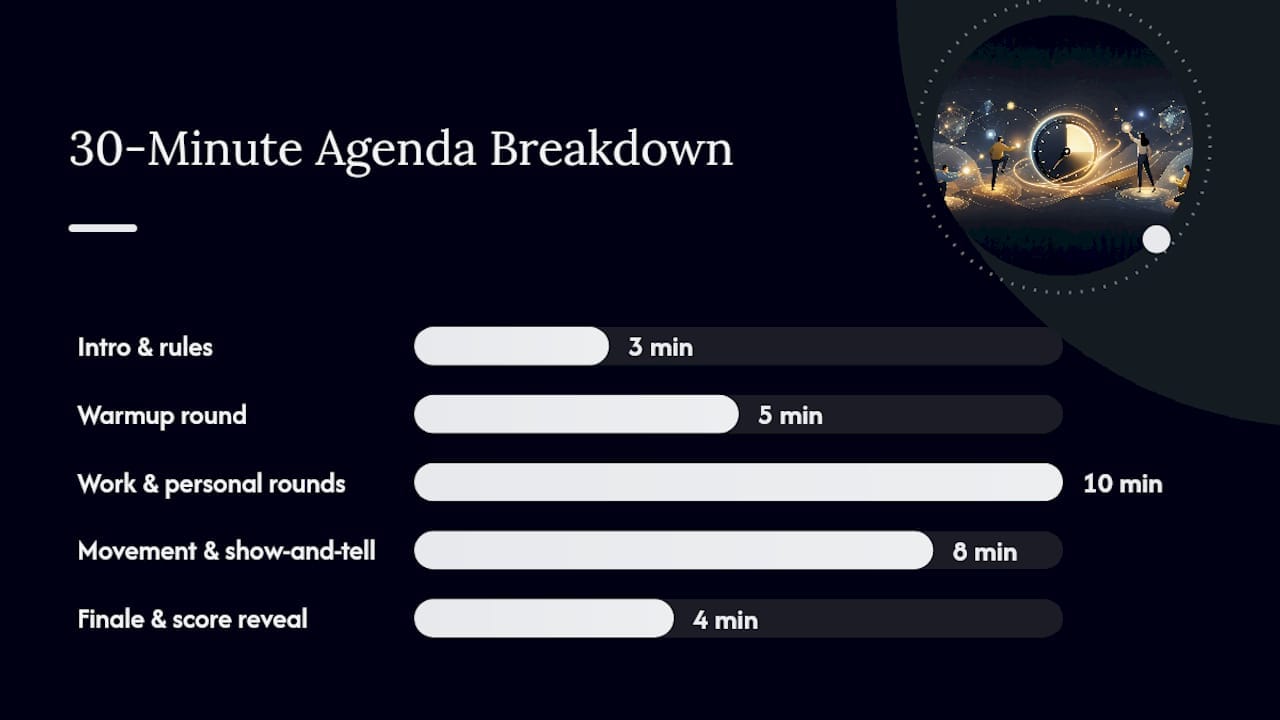
Minute-by-minute flow: 0 to 3 minutes for intro and rule script, 3 to 8 minutes for the warmup round, 8 to 18 minutes for work-related and personal rounds, 18 to 26 minutes for movement and show-and-tell, 26 to 30 minutes for the finale round and score reveal.
| Scoring element | Points |
|---|---|
| Standard item found in time | 1 point |
| Story bonus (30-second anecdote) | +2 points |
| Wildcard creativity bonus | +3 points |
| Tie-breaker | Group vote on 15-second story |
Host script, opening: “We’re running six quick rounds, 60 seconds per item. Grab what you can, no rummaging through private spaces, and opting out is always fine.”
Host script, between rounds: “Nice work, team. Scores are up on screen. Next round starts in ten seconds.”
Host script, closing: “That’s a wrap. Drop your favorite photo in the channel so we don’t lose it. Great round, everyone.”
Why This Format Works and a Facilitator Checklist to Keep Handy
Short structured rituals do more for remote cohesion than most HR teams expect. Atlassian frames virtual team-building as a strategic investment in cohesion and performance, not just a fun break, and Harvard Business Review’s guidance on remote motivation points to the same pattern: brief, repeatable rituals with real follow-up sustain connection better than one-off events. MIT Sloan’s research on remote worker connection also backs shorter, mixed-format sessions as a defense against video-call fatigue.
Keep this one-page checklist on hand before every session:
- Roles assigned: host, timekeeper, scorekeeper
- Tech tested with one volunteer beforehand
- Pinned photo channel ready
- Point system and tie-breaker rule decided in advance
- Opt-out and asynchronous options communicated
Scale the same format into a longer retreat agenda once your team is ready for a multi-hour or in-person version.
One Tweak That Changed How Our Sessions Landed
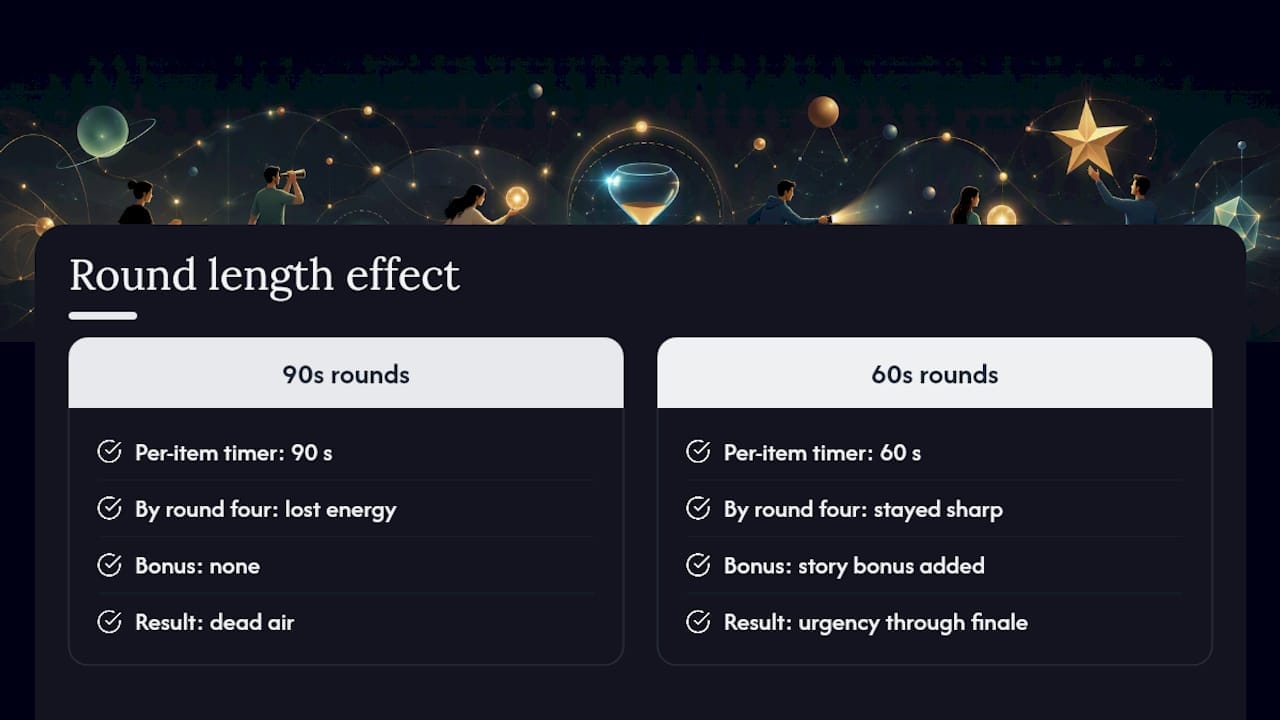
The biggest shift I’ve seen in how these sessions play out came from cutting round length, not adding more prompts. Teams that ran 90-second items per round lost energy by round four. Teams that dropped to 60 seconds and added a story bonus stayed sharp through the finale, because the pressure created urgency instead of dead air.
Three fixes worth trying immediately: tighten your per-item timer to 60 seconds, rotate the host and scorekeeper roles every session so it’s not always the same person carrying the game, and always end with a shared photo drop instead of just a final score. That last step is what turns a 30-minute activity into something your team actually remembers a month later.
Cohesion doesn’t come from the scavenger hunt itself. It comes from what the team does with the story afterward.
— Amichai
Turnkey Facilitation When You’d Rather Not Build the Runbook Yourself
Building the list is the easy part. Running it well, with the right pacing, roles, and follow-up, is where most in-house attempts lose steam after two sessions. We handle facilitation end-to-end: custom prompts tailored to your team’s culture, live facilitation support, and a post-event synthesis that helps capture key outcomes. You get a runbook that works out of the box and a measurable read on what landed, instead of a spreadsheet nobody updates.
If your team is ready for something bigger than a single 30-minute session, Nomadexcel also designs full company retreats that build this kind of activity into a longer program focused on alignment and trust. Request a consult through Nomadexcel’s retreat page to get a tailored plan for your next session.
Sources
- Atlassian: virtual team-building activities for remote teams
- Deel: non-cheesy virtual team-building activities
- Microsoft Support: manage breakout rooms in Teams
- Harvard Business Review: how to keep your team motivated remotely
- LearnClash: 73 virtual scavenger hunt ideas