
Managers: 20 Remote Team Building Activities with Scripts and Metrics
The most effective team building activities for remote teams fall into five categories: games and challenges, social connection, creative and skill-sharing exercises, wellbeing practices, and short daily rituals. Running one short ritual weekly alongside one deeper session monthly builds the trust, collaboration, and sense of belonging that distributed teams need most. The payoff is measurable: stronger psychological safety, better knowledge sharing, and a real dent in the isolation that remote work can quietly create.
TL;DR:
- Regular short rituals every one to two weeks are more effective for building trust and familiarity than infrequent, large-scale events.
- Coordination activities like problem-solving exercises or group decision-making have a stronger impact on psychological safety than personal disclosure-focused icebreakers.
- Quick pulse checks immediately after activities, along with follow-up indicators over weeks, reliably measure whether team building efforts enhance collaboration and trust.
- For deeper strategic work or trust rebuilding, facilitated retreats and structured programs offer significantly more impact than internal, DIY activities.
- Technical preparation, including testing tools, accommodating bandwidth variations, and recording sessions, is critical to prevent disruptions that can derail remote team activities.
Table of Contents
- 1. A Quick Shortlist by Category and Time Commitment
- 2. Twenty Ready-to-Run Activities with Facilitator Scripts
- 3. How Do You Plan and Run a Session That Actually Works?
- 4. Why Certain Activity Designs Build Real Trust
- 5. Measuring Whether an Activity Actually Landed
- 6. When DIY Activities Are Enough and When to Bring In a Facilitator
- 7. Solving the Technical Snags That Derail Remote Sessions
- 8. What Most Managers Get Wrong About Team Building
- 9. Nomad Excel: Tailored Retreats for Teams That Want More
- Sources
- FAQ
1. A Quick Shortlist by Category and Time Commitment
Choosing the right activity often comes down to two questions: what does the team need right now, and how much time can everyone realistically give? A team fresh off a stressful sprint needs something restorative, not competitive. A team that just onboarded three new hires needs rapport-building, not deep strategic alignment. Sorting activities by category and duration makes that decision fast.
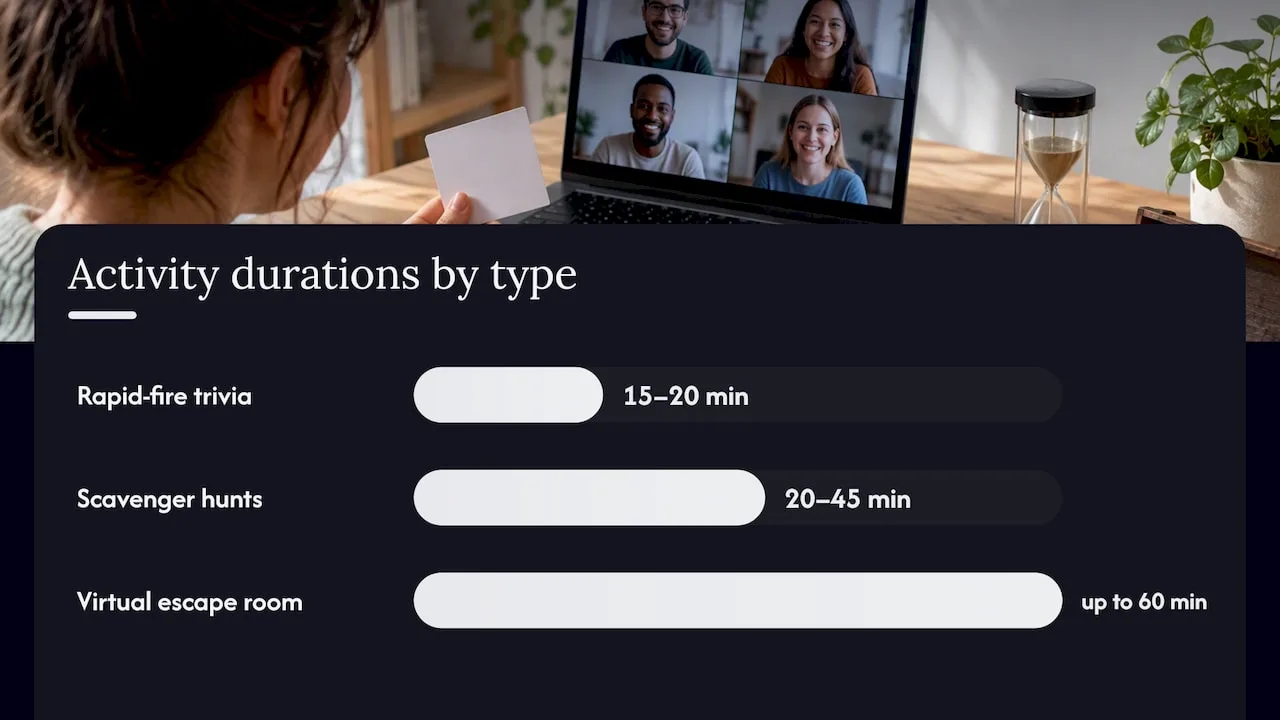
Games and challenges work best when a team needs to practice problem-solving together under light pressure. Rapid-fire trivia usually takes about fifteen to twenty minutes and suits teams that enjoy quick competition. A virtual escape room can last up to about one hour and rewards groups that already collaborate reasonably well, since it demands coordination under a clock. Scavenger hunts tend to last between twenty and forty-five minutes and work particularly well for larger or newer teams because they force small talk without requiring people to perform.
Social and connection activities exist to rebuild the incidental rapport that hallway conversations used to provide. Speed networking rounds, where pairs rotate every three to five minutes, fit teams larger than fifteen people who do not interact daily. Virtual coffee chats, typically fifteen to twenty minutes long with no agenda, suit any team size and work best as a recurring fixture rather than a one-off. A “win of the week” round, where each person shares one thing that went right, takes 10 to 15 minutes and works well to open a Monday meeting.
Creative and skill-share sessions turn expertise into connection. A show-and-tell, where team members present a hobby, book, or project for a few minutes each, works well for teams of about eight or fewer. A skill swap, where two colleagues teach each other something unrelated to work in roughly twenty to thirty minutes, tends to surface talents managers never knew existed. A collaborative team playlist, built asynchronously over a week, costs almost no live time and still gives people a shared cultural touchpoint.
Wellbeing and mindfulness activities matter more than many managers assume, given that fully remote employees report higher daily stress than their hybrid peers, according to Gallup’s research on remote work. A guided breathing session of a few minutes, a gratitude circle where each person names one thing they appreciate, and a short desk yoga break led by video all fit easily into a brief slot before or after a meeting.
Quick five- to fifteen-minute rituals are the connective tissue that holds the rest together:
- Emoji check-ins, where each person opens a meeting by reacting with one emoji that describes their week, take under two minutes and read the room instantly.
- Two truths and a lie works as a five-minute icebreaker for new team members or mixed groups who have not met.
- Pet pic sharing in a dedicated chat channel costs zero meeting time and consistently drives engagement in distributed teams.
For onboarding specifically, a buddy coffee chat scheduled in the first week and a lightning-round intro during a new hire’s first team meeting recreate the informal connections that in-person offices offer by default.
2. Twenty Ready-to-Run Activities with Facilitator Scripts
Each of these can be run with minimal prep. Where a live session is hard to schedule across time zones, an async alternative is noted.
- Rapid-fire trivia (15 minutes, video call, any tool with a shared screen): Prepare ten questions about the company or pop culture. Split into two teams in breakout rooms for one minute of strategy per question. Reconvene, reveal answers, and keep score on a shared doc. Async option: post questions in a channel with a 24-hour answer window.
- Virtual escape room (45 to 60 minutes, dedicated escape-room platform): Assign roles at the start (clue reader, timekeeper, tool user). Run one shared puzzle for small teams, or split into breakout rooms with a race to finish for larger ones. Debrief for five minutes on what worked.
- Virtual scavenger hunt (20 to 45 minutes, video call): Read out ten household or workspace items to find. Give a two-minute cap per item. A ready-to-use scavenger hunt list removes the prep entirely.
- Speed networking (20 minutes, breakout rooms): Rotate pairs every three minutes with one prompt per round. Best for teams larger than fifteen who rarely interact directly.
- Coffee chat roulette (15 minutes, calendar-integrated pairing tool): Auto-pair two people weekly with no agenda required.
- Win of the week (10 minutes, any video tool): Go around the call, one win per person, no follow-up questions unless invited.
- Show-and-tell (25 to 30 minutes for eight people, video call): Five minutes per person, one slide or object, no Q&A pressure.
- Skill swap (20 to 30 minutes, screen share): Pair two colleagues; each teaches a five-minute mini-lesson.
- Collaborative playlist (async, one week, shared music app): Post a theme, let people add songs over several days.
- Guided breathing break (5 to 10 minutes, video call): One volunteer leads a simple breath count before a meeting starts.
- Gratitude circle (10 minutes, video call): Each person names one thing, no elaboration required, which keeps introverts comfortable.
- Desk yoga (10 to 15 minutes, video call): Follow a short recorded sequence together, cameras optional.
- Emoji check-in (2 minutes, chat or video): One emoji per person to open the meeting.
- Two truths and a lie (5 to 10 minutes, video call): Each person states three facts, the group guesses the false one.
- Pet pic sharing (async, dedicated channel): No live time needed, ongoing engagement.
- Buddy coffee chat (15 minutes, first week of onboarding): Pair a new hire with a tenured teammate for an informal call, a practice Slack’s onboarding guidance also recommends.
- Lightning-round intros (10 minutes, team meeting): New hire answers three quick questions live.
- Peer problem-solving session (30 minutes, shared doc plus video): Present one real work challenge, let the group brainstorm solutions together, which builds the kind of visible expertise that Frontiers in Psychology’s research on virtual teams ties to stronger knowledge sharing.
- Culture spotlight (15 minutes, async or live): One team member shares a tradition or custom from their region, framed as opt-in to respect comfort levels across cultures.
- Async highlight reel (ongoing, shared video folder): Record snippets from live sessions so people in incompatible time zones still feel part of the moment.
For introverts, favor structured turn-taking over open floor discussion, and always offer a chat-based or written alternative to speaking on camera. A deeper catalogue of ready-to-run team building activities covers additional options for teams that want more variety.
3. How Do You Plan and Run a Session That Actually Works?
A good session starts before anyone logs on. Define the objective first: are you building rapport among strangers, relieving stress after a hard quarter, or practicing coordination ahead of a big launch? That objective determines which category of activity to pick and what success looks like afterward.
Scheduling fairness matters more in distributed teams than almost anything else. Rotate meeting times so the same region is never stuck joining at 6 a.m. or staying past dinner, and offer an async alternative or recording for anyone who cannot attend, a practice Zoom’s team-building guidance specifically recommends.
Before the session:
- Assign clear roles: a host to manage logistics, a facilitator to run the activity, a timekeeper, and a note-taker.
- Pre-brief facilitators on the script and likely questions so the session doesn’t stall.
- Test the tech: breakout rooms, polls, and shared docs, at least once before the live event.
- Offer a low-bandwidth option, such as a phone dial-in or a chat-only mode, for anyone with connectivity limits.
- Avoid forcing personal disclosure: structured prompts work better than open-ended “share something personal” requests.
During facilitation, encourage structured sharing rather than free-for-all conversation, and close every session with a short debrief that produces one or two action items. That closing step is what turns a fun activity into something the team actually remembers.
Pro Tip: Send the agenda and any prompts 24 hours ahead so people who process information better in writing can prepare instead of freezing on the spot.
4. Why Certain Activity Designs Build Real Trust
Not every activity builds trust equally. Coordination tasks and shared decision-making do more for psychological safety than icebreakers built around personal disclosure. A Group Decision & Negotiation study found that team-based interventions improved psychological safety in global virtual teams, and that the effect ran through better coordination quality rather than simple bonding time.

Coordination beats disclosure for building trust that lasts. Pairing an activity with visible follow-through matters just as much: trust-building exercises need leader modeling and consistent action afterward, or the goodwill fades within days, according to IESE’s research on virtual team trust. Skip the “tell us something no one knows about you” format in favor of structured prompts and a short retrospective that asks what worked and what to try next.
5. Measuring Whether an Activity Actually Landed
A quick pulse check beats a long survey every time. Right after the session, ask one to three simple questions through a poll or chat: did this feel useful, would you want to do this again, and what would you change.
- Run the pulse immediately, while the experience is still fresh, using a one-click poll rather than a form.
- Hold a short retrospective: what went well, what surprised us, what we would change next time.
- Watch follow-up indicators over the following weeks, such as more voluntary knowledge sharing, higher meeting participation, or managers noticing smoother collaboration on shared projects.
- Set a cadence: a brief pulse after every event, plus a fuller check at 30 and 90 days to see if the effect held.
This kind of lightweight measurement gives a manager enough signal to decide whether to repeat an activity or swap it out, without turning team building into another reporting burden.
6. When DIY Activities Are Enough and When to Bring In a Facilitator
Some providers run immersive entrepreneurship bootcamps and custom company retreats built around structured facilitation, direct mentorship, and designed group experiences rather than one-off games. That distinction matters when deciding how far to take internal team building efforts.
DIY activities handle most of the regular work well: weekly rituals, onboarding touchpoints, and small morale boosts don’t need outside help. A facilitated retreat earns its cost when the goal is deeper, such as realigning a team around a strategic direction, rebuilding trust after a difficult stretch, or running a structured innovation sprint that needs an experienced outside guide. Teams considering that step can review Nomad Excel’s approach to tailored business retreats for a sense of what a facilitated program looks like in practice.
7. Solving the Technical Snags That Derail Remote Sessions
Most failed virtual activities die from a technical hiccup rather than a bad idea. The fixes are usually simple and worth handling before the session, not during it.
Test breakout rooms, polls, and shared documents at least once before the live event, ideally with the facilitator alone rather than the full team. Confirm that whichever platform you use supports the group size without lag, since some video tools cap breakout room capacity or degrade with too many active cameras.
Bandwidth varies wildly across a distributed team, so build in a fallback: a phone dial-in option, a chat-only mode for anyone whose connection can’t handle video, and a written version of any instructions that are normally given verbally. For scavenger hunts or games that rely on physical props, send the item list in advance so no one scrambles at the last second.
Time zone math causes more silent no-shows than any other single issue. Rotate hosting times across events so no region is permanently stuck with an inconvenient slot, and record every session for anyone who cannot attend live. A short highlight reel afterward keeps those team members feeling included rather than left out.
Finally, keep a backup plan for the inevitable dropped connection or frozen screen: a co-facilitator who can take over instantly avoids the awkward silence that kills momentum and makes people reluctant to try the next activity.
8. What Most Managers Get Wrong About Team Building
The biggest mistake I see is cramming team building into occasional big events and calling it done. A single elaborate offsite or virtual escape room once a quarter may seem impressive, but it is less effective for building trust than a short ritual repeated weekly. Consistency builds familiarity, and familiarity is what actually makes people comfortable enough to speak up in a meeting or admit they’re stuck on something.
Rotate your meeting times honestly, not just once but as a standing practice, and design every activity with your quietest team member in mind rather than your most extroverted one. And tie the activity to something real: a scavenger hunt with no connection to how your team works together is a nice distraction, nothing more.
My rule of thumb: one short ritual every one to two weeks, plus one deeper session per quarter, or sooner if the team is going through real change. That rhythm keeps connection alive without turning team building into another obligation on an already full calendar.
— Amichai
9. Nomad Excel: Tailored Retreats for Teams That Want More
Running your own rituals week to week works well for the day-to-day. When a team needs a deeper reset, alignment on strategy, or a genuine creative jolt, that’s usually where a facilitated program does more than another internal Zoom call.
Nomad Excel designs custom company retreats and offsite bootcamps that combine structured workshops, mentorship, and real-world experiences in destinations chosen to pull people out of their usual routine. The programs are built end to end, from the workshop content to the logistics, so a team leader isn’t left assembling an agenda from scratch.
What that looks like in practice:
- Tailored business retreats built around your team’s specific goals, whether that’s alignment, leadership development, or innovation.
- Offsite bootcamps that combine structured learning with hands-on collaboration over several days.
- Personal skills and team building retreats focused on strengthening trust and communication beyond what a single virtual session can achieve.
Teams that want to explore what a facilitated experience looks like can start with Nomad Excel’s online entrepreneurship bootcamp to see how the format works before committing to a full retreat.
Sources
- The Remote Work Paradox: Higher Engagement, Lower Wellbeing — Gallup
- Fostering psychological safety in global virtual teams: The role of team-based interventions — Group Decision & Negotiation
- How trust in coworkers fosters knowledge sharing in virtual teams — Frontiers in Psychology
FAQ
What are the best team building activities for remote teams?
The strongest options combine games and challenges, social connection, creative skill-sharing, and short wellbeing rituals, since each builds a different kind of trust. Coordination-based activities, like peer problem-solving or collaborative puzzles, tend to build psychological safety more reliably than open-ended personal sharing, according to research on team interventions.
How often should a remote team do team building activities?
A short ritual every one to two weeks paired with one deeper session per quarter tends to work better than infrequent, elaborate events. Consistency keeps trust and familiarity active, while a quarterly deeper session gives room for bigger goals like alignment or innovation.
How do you measure if a virtual team building activity worked?
Run a quick one to three question pulse check right after the session using a poll or chat, then observe for follow-up signals such as increased voluntary knowledge sharing or smoother collaboration in the following weeks. A fuller check at 30 and 90 days shows whether the effect held, an approach that lines up with Gallup’s findings on remote engagement and wellbeing.
When should a team choose a facilitated retreat instead of DIY activities?
DIY rituals handle regular connection and onboarding well, but a facilitated retreat makes more sense for deeper goals like strategic alignment, rebuilding trust after a rough stretch, or running a structured innovation sprint. Nomad Excel’s tailored business retreats are built for exactly that kind of deeper reset.
How do you keep introverts engaged in virtual team building?
Use structured turn-taking instead of open floor discussion, and offer chat-based or written alternatives to speaking on camera. Short, low-pressure formats like emoji check-ins or gratitude circles tend to work better for introverts than free-form personal sharing exercises.
Comments are closed.